CIMA Approved Calculators: What's Allowed
For CIMA exams you may use a scientific calculator with basic programming or standard memory functions, or a solar-powered model - or the on-screen calculator provided at the test centre. Anything with graphical displays, alphanumeric keyboards or external programming is banned. Always check the latest CIMA and Pearson VUE guidance before your exam.
The last thing you want when you’re ready to write your exam is to have problems with the kind of calculator you’ve brought to the exam.
To avoid these problems, we’ve put tother an easy reference guide to help you avoid calculator problems!
CIMA Regulations
CIMA and Pearson VUE have strict regulations about which CIMA exam calculator is permitted. Exam candidates should read the CIMA Guide and print it out to avoid misunderstanding with the administrator on the day of the exam.
Calculator Guidance
There are two pre-approved options for calculator use.
- Personal calculators (see a pre-approved list below)
- Computer-based calculator (this is an on-screen scientific calculator) - you will be allowed 15 minutes prior to the exam to practice using the calculator
- CIMA Approved List of Calculators
Approved calculators must fall into the category of scientific calculators with basic programming functions, calculators with standard memory functions or solar-powered calculators.
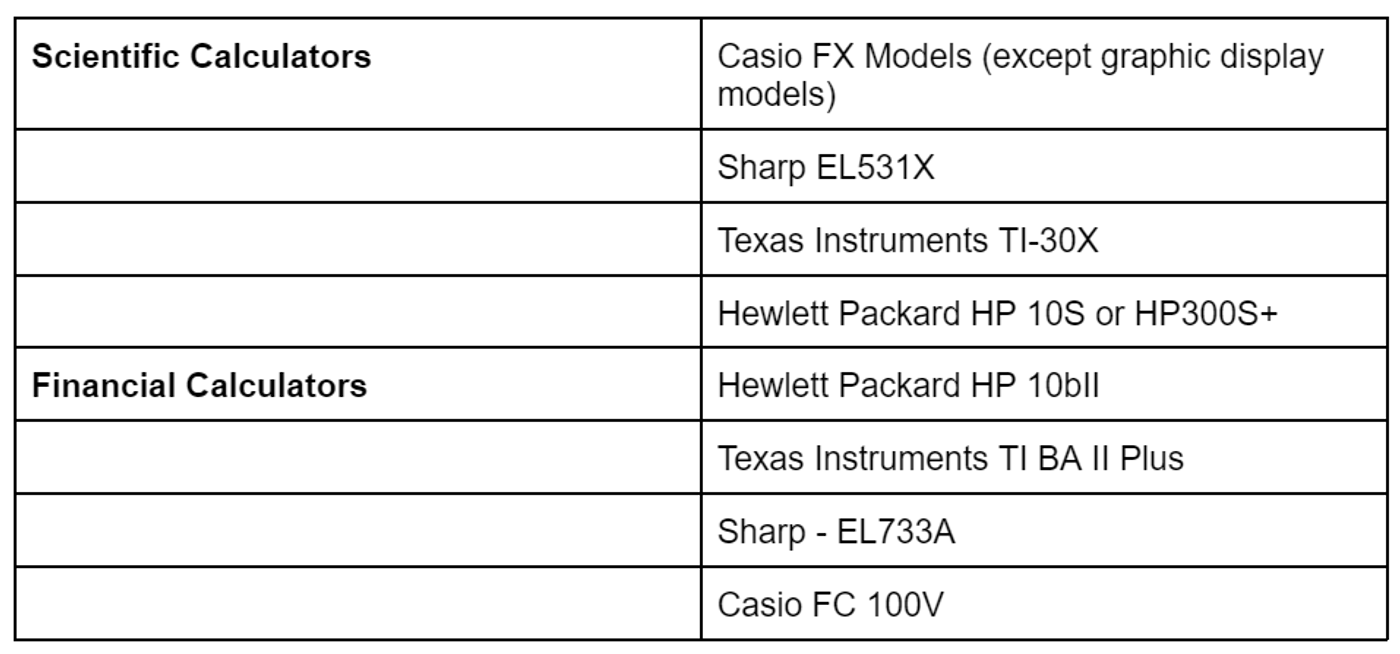
- List of Calculators Not Allowed
Unacceptable calculators include models or equipment that contain:
- alphanumeric keyboards (an alphanumeric display of stored data - including text - equations, or alphabetic formulae)
- personal organisers
- checklists and memo pads
- capability for external programming
- graphical displays (which can often be identified by model types that end in the letter ‘G’); they also typically have large screens - see image below
- symbolic algebraic capability
- calculators which do not have their own internal power supply
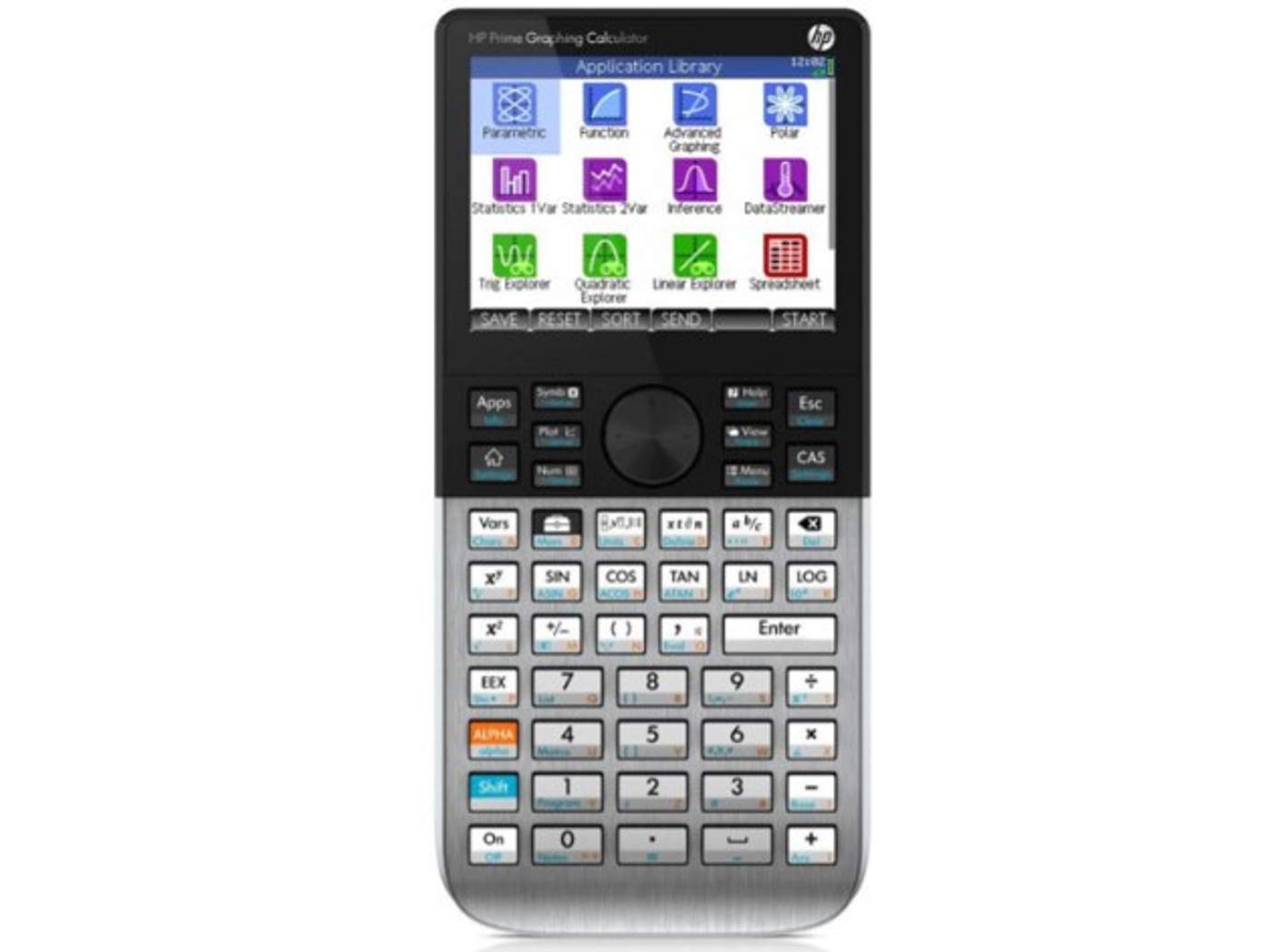
Graphic Display Calculator
- What To Do if You’re Not Sure About Your Calculator
No doubt you would want to use the calculator that you are familiar with. What if this calculator is not on the approved list?
You can make your request to CIMA in writing at cima.contact@cimaglobal.com . Please note that such requests will only be considered bi-annually during the reviews in June and December.
When you make a request, ensure you have the full name of the calculator and the model number (as per the manufacturer's booklet). You will receive an acknowledgment from CIMA customer support that your email has been accepted, and an answer will be given after the reviews take place.
What To Expect on the Day of the Exam
An exam administrator will check that you have the approved calculator and will reset it before you begin the exam. This means that you will need to know how to reset your functions as quickly as possible so that you do not waste time.
You will not be allowed to bring any instructions on how to use the calculator to the exam with you, so it is imperative that you spend time using an approved calculator long before the exam.
Most calculator brands have a tutorial that can be found on the manufacturer’s website or YouTube. These are very helpful if you are unfamiliar with a calculator you want to use.

Source: Canva.com
A Word of Warning
This is not the time to take a chance with an unapproved calculator. Exam administrators strictly follow the CIMA and Pearson VUE regulations to ensure the integrity of CIMA exams.
Also, ensure your calculator has a new battery and, if it is solar-powered, it is in working order. These may seem like minor issues, but they can cause unnecessary problems during exams.
In Closing
Well, there you have it. A quick reference guide to acceptable CIMA calculators.
We hope that this will help you plan your exams successfully. Contact our customer support team if you have any questions regarding CIMA study material .
Frequently asked questions
Which calculators are approved for CIMA exams?
Scientific calculators with basic programming or standard memory functions, and solar-powered models, are approved. You can also use the on-screen calculator provided in the exam.
What if my calculator isn't on the approved list?
You can email CIMA in writing to request approval. Requests are only reviewed twice a year, in June and December, so allow plenty of time before your exam.
What happens to my calculator on exam day?
An exam administrator checks that your calculator is approved and resets it before you start, so practise resetting it quickly beforehand.
Related guides
CIMA Pass Rates: The Most Recent Numbers
The most recent CIMA pass rates published: Case Study exams run 53-71% by window, Objective Tests range from 44% (P2) to 83% (E1). Full tables inside.
Updated June 2026
CIMA Exam Structure: The Full Syllabus Explained
CIMA has three professional levels - Operational, Management and Strategic - each with three 90-minute Objective Tests plus one 3-hour Case Study exam.
Updated June 2026
CIMA Exam Dates: Upcoming Windows and How to Book
All CIMA Case Study exam dates for 2026: August and November windows, pre-seen release dates, scheduling deadlines and results days for OCS, MCS and SCS.
Updated June 2026